
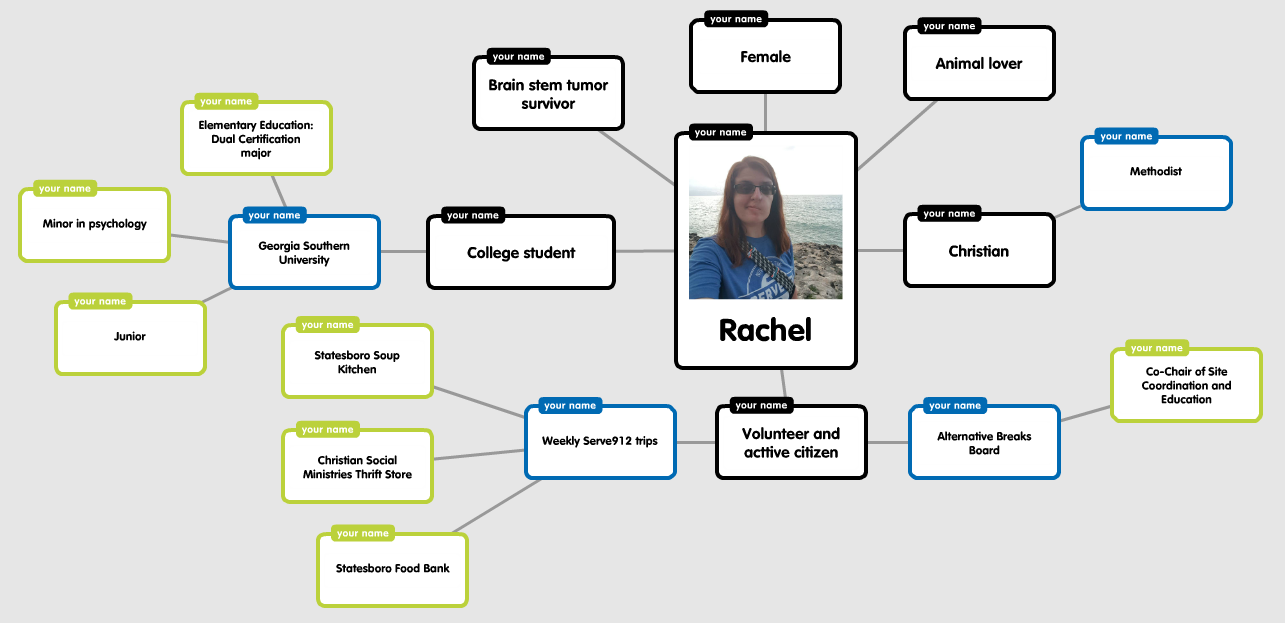
Popplet is an online tool that allows users to map out and visualize their ideas! This technology is a fantastic way to get students engaged in the content through the creation of unique timelines, graphic organizers, and multiple forms of visual organization! Popplet not only
encourages students to brainstorm, but also allows them to collaborate and present their ideas on larger topics!
Tool Name: Popplet

- Tool creator(s)/company: Albert Lee, Jared Schiffman, & Phillip Tiongson
- Founded on November 1st, 2009 in New York
- Cost
- Free
- Online website – PC, Mac, Chromebook (limited to 10 popplets)
- Popplet Lite app on iOS (limited to 1 popplet)
- Additional cost
- iOS app = $4.99
- The Monthly Plan = $3/month (unlimited popplets + all features)
- The Yearly Plan = $30/year (unlimited popplets + all features)
- For classrooms
- Unique educational subscription discount for “Popplet Schools”
- Prices for a year
- Up to 50 subscriptions = $2/student
- 51-100 subscriptions = $1.50/student
- 101-250 subscriptions = $1.25/student
- 251-500 subscriptions = $1/student
- 501-1000 subscriptions = $0.75/student
- Over 1000 subscriptions = $0.50/student
- Free
- Platform(s): Online website & iOS-compatible devices (suggested device = IPad)
- If using Popplet on a PC or Mac, Adobe Flash Player is required to run the software
- Target audience = students, teachers, and adults
- Popplet for school – For learning in the classroom and at home
- Popplet for work – For generating ideas in the office or on the go
- Features
- Mind-mapping for lesson topics and classroom procedures
- Students create text in bubbles to connect details to describe larger topics. They can color-code and virtually move the popples around as they wish.
- In addition to text, students can add drawings or upload images or videos to supplement their responses.
- Presentation
- Popplet Linker = individual boards are linked and stored together for ease of access
- Popplet Comments = encourages collaboration by commenting on individual popples
- 2 Presentation modes
- Mind-mapping for lesson topics and classroom procedures
- Usability
- This tool works really well for classroom settings, as long as students and teachers have access to the Internet. And as long as students have the login information readily available, the creation process is straightforward and simple.
- Aesthetics
- The design is clean, and while you can change the background color, it is not so harsh as to make the text hard to read. The white bubbles with the black text ensures that the text is clear and easy to read.
- All of the tabs directly define their functions, and there is an undo button in case students make mistakes while creating.
- Technical issues/concerns
- The Popplet website does take a while to load on a laptop or desktop, so if internet connectivity is slow, a teacher might have trouble accessing this tool immediately in the classroom. When I tried it out on my computer, I had to open the website in a different Chrome window all by itself before it would load completely. That being said, reviewers seem to enjoy the IPad app and experience little to no problems with connecting.
- Collaborating is only available on the online version, so students would need Chromebooks or desktop computers in order to comment on other Popplets.
- Value
- I definitely think that Popplet is worth the money! Whether students pay between $1 – $2 for a year of access or teachers purchase the program for whole-group instruction, Popplet provides an interactive visual where students and teachers can map out their thoughts on various subject areas! It can be used for all subjects (ELA, Math, Science, SS), as well as describing classroom procedures (i.e. how to handle technology in the classroom). Because of the wide range of uses, I believe that this website/app is valuable and worth the money.
- Recommendations for educational usage
- This tool could be used in the classroom in lots of ways!
- Lesson planning: brainstorming ideas
- Listing classroom procedures (i.e. how to handle Chromebooks)
- Various subject area topics (examples below)
- ELA: how prefixes and suffixes change words
- Math: breaking apart numbers
- Science: sorting solids, liquids, and gases
- SS: listing details about a historical figure
- Additional teaching strategies
- Family tree
- Class whole-group brainstorming (like a KWL chart)
- Small group projects
- This tool could be used in the classroom in lots of ways!
- Emotional reaction
- Even though the initial logging in process was frustrating on a computer, I thoroughly enjoyed the layout and aesthetic of Popplet. In my opinion, the tools are very easy to use and manipulate, and the color-coding is great for further organizing popples!
- Overall assessment based on instructional design models:
- Given the adequate access to technology, I believe that Popplet is a fantastic resource that teachers can use at any grade level and that students can start using around 2nd grade.
- ASSURE Instructional Design Model
- Analyze learner characteristics
- Popplet can be used to map out topics in all subject areas. Visual learners will benefit from the comfortable and clear visuals, while tactile learners will benefit from individually manipulating the popples and typing in the information. In presentation mode, auditor learners can benefit if the presentation is pre-recorded (or they can listen as the presenter is describing the map)
- State Standards and Objectives
- Here is one example of a standard that could be applied to this tool:
- ELAGSE3RL2: Recount stories, including fables, folktales, and myths from diverse cultures; determine the central message, lesson, or moral and explain how it is conveyed through key details in the text.
- Here, students could have the title of the story in the middle, with the characters, setting, plot, and central message branching out. Key details can be added throughout to support responses.
- Here is one example of a standard that could be applied to this tool:
- Select Strategies, Technology, Media, and Materials
- Instruction could be teacher-centered if the Popplet is already prepared. Conversely, Popplet could be student-centered if the students have the opportunity to create their own Popplet individually or in small groups.
- The technology required for Popplet includes internet access, a SMARTBoard, and Chromebooks or IPad’s.
- Utilize Technology, Media, and Materials
- Before instruction, the teacher could have samples of the responses that he/she is expecting from students prepared before the lesson. This way, he/she can guide students in the right direction and give the students examples if they are struggling.
- All technology (i.e. Chromebooks or IPad’s) should be made available before the start of the lesson, if the learning is student-centered.
- Require Learner Participation
- If the students are creating their own Popplets, their active participation is required. To ease the anxiety and clear up expectations, the teacher could model an example before the students create their own. This will get students familiar with the tools and layout of the software.
- Evaluate and Revise
- The teacher can verbally ask students if they enjoyed the Popplet program and if it made learning specific topics clearer. The responses can allow the teacher to gauge interest and incorporation of Popplet in future lessons. Furthermore, the student-made Popplets can give the teacher an idea of the overall understanding of the student progress and knowledge of the topic and program.
- The teacher can continue to research learning tools that might be more appropriate for different lessons.
- Analyze learner characteristics
” With its easy and fun method of visually organizing ideas, Popplet offers teachers and students many potential classroom applications.” — Jason Tomaszewski, EducationWorld Associate Director
“We are proud that Popplet is helping a new generation of digital natives to emerge with skills in organizing information and thinking about how ideas – and the world we live in – are all connected.” — Heidi Echternacht, teacher and co-founder of Kinderchat
- http://blog.popplet.com/10-great-popplet-ideas-for-the-classroom/#more-4156
- http://blog.popplet.com/popplet-helps-teachers-make-better-lessons/#more-2987
- https://www.crunchbase.com/organization/popplet
- https://educationaltechnology.net/assure-instructional-design-model/
- https://www.educationworld.com/a_curr/site-reviews/popplet.shtml
- https://www.fractuslearning.com/mind-mapping-students-popplet/
- http://www.popplet.com
- https://teachinghistory.org/digital-classroom/tech-for-teachers/25107
- ** All resources accessed on February 23, 2019 **

 Tool Time Showcase